
 영어
영어 포르투갈어
포르투갈어 스페인어
스페인어 말레이어
말레이어 인도네시아어
 독일어
독일어 터키어
터키어 베트남어
베트남어 프랑스어
프랑스어 러시아어
러시아어 아랍어
아랍어 태국어
태국어 일본어
일본어 한국어현재 Current

상품 소개
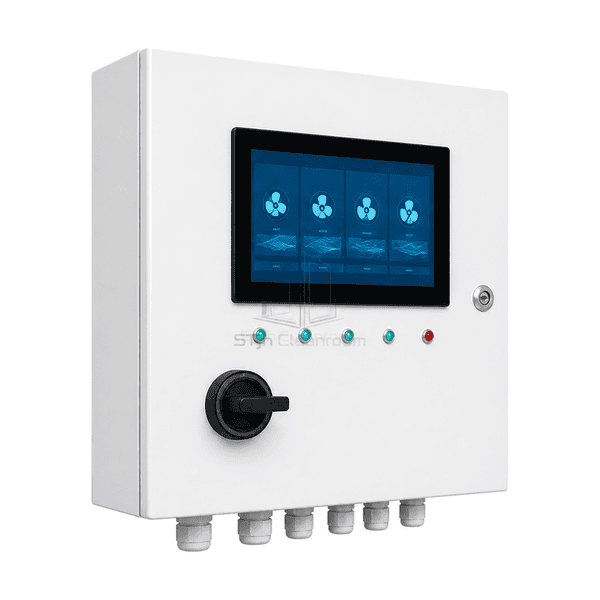
The FFU group control panel gives a room or process cell its own operating point between individual fan controls and a central building interface. Its wall enclosure houses the local display or switches, control electronics and field connections for the selected group. A shared signal arrangement sends a common request, whereas an addressed version exchanges information with compatible fan cards. These are different control architectures, chosen around the required operating visibility and the installed FFUs.
주요 기능
The interface can suit routine staff operation rather than exposing every maintenance setting.
Group boundaries can follow the actual production cell, room or mini-environment.
Analogue and addressed versions offer different levels of feedback and expansion.
응용 프로그램 솔루션
Room-level control should make the correct group easy to operate while leaving individual fans properly balanced.
Operators must adjust several controls for one production change.Use a coordinated group command with local balancing preserved for the individual FFU duties.
A shared speed signal provides no explanation when one fan stops.Select the feedback path needed to distinguish a drive fault from a normal group stop.
The local control needs to remain understandable to non-maintenance staff.Choose clear room labels and only the operating selections required for that area.
A later supervisory system needs access to the group.Reserve a supported upstream interface and document ownership of local versus remote commands.
일반적인 응용 프로그램
싱글 클린 룸 FFU 존모듈 형 실험실 스위트깨끗한 부스와 미니 환경가운 방 천장 그룹독립 생산 세포
기술 매개변수
Common reference control choices for a room-group FFU panel.
| Control Scope | Coordinated commands for one room or defined FFU group |
|---|---|
| Common HMI Supply | 24 VDC touchscreen/control-electronics option |
| Analogue Group Command Option | 0-10 VDC reference to compatible EC fan-control inputs |
| Addressed Network Option | RS-485 Modbus RTU with a matched fan-control data map |
| Local Interface Options | Touchscreen, keypad or rotary/selector operating interface |
| Group Functions | Start/stop request and shared speed command; preset operating modes as configured |
| Status and Alarm Options | Local indication, selected drive feedback and a summary relay interface |
| Mounting Arrangement | Wall-mounted enclosure with dedicated field cable entry |
| 사용자 정의 | 의도된 응용 프로그램 및 운영 환경에 따라 사용할 수 있습니다. |
사용 가능한 옵션
Touchscreen or switch-based operator faceCommon analogue reference or addressed FFU networkSummary status and alarm relay packageDocumented upstream Modbus connection
Select the group architecture before choosing the panel hardware. Additional preset modes and feedback channels depend on the connected fan electronics and software scope.
Selection and Installation
Choose shared analogue or addressed operation
A shared analogue reference suits a group that follows one command, while a compatible addressed network can provide device-specific status and settings. Count the actual control inputs and check output loading, reference supply and any required signal distributor. Do not assume an unlimited number of inputs can be connected in parallel or that equal command voltage produces equal airflow.
Identify what the operator needs to know
Separate a group run request, confirmed fan operation, a drive fault and a lost communication path. A simple analogue output does not automatically return individual alarms. If a summary relay is required, define its normal state, contact rating and what happens when panel power fails.
Plan the room-side interface
Locate the panel where authorized staff can operate it without disturbing the clean work area. Choose the HMI or switch format, cleaning-compatible enclosure and mounting depth, with cable entry away from the operating face. Keep fan mains circuits separate from low-voltage control terminals; a 24 VDC HMI reference does not specify every controller's supply.
Keep expansion proportional to the task
For future central supervision, select a documented upstream interface and define who may change the group setpoint. A network socket alone does not make the panel a building-management gateway. Where several rooms need a shared overview, compare the FFU central control system and its command hierarchy.
FFU 그룹 제어판 사양 계획?
치수, 설치 조건, 성능 목표 및 필요한 표면 마감을 보내십시오.