 Englisch
 Portugiesisch
 Spanisch
 Malaiisch
 indonesisch
 DeutschCurrent
 Türkischer Sprache
 Vietnamesisch
 Französisch
 Russisch
 Arabisch
 Thailändisch
 Japanisch
 Koreanisch
A defined network boundary
Expose the operating points needed by the facility system without replacing the fan's local drive electronics.



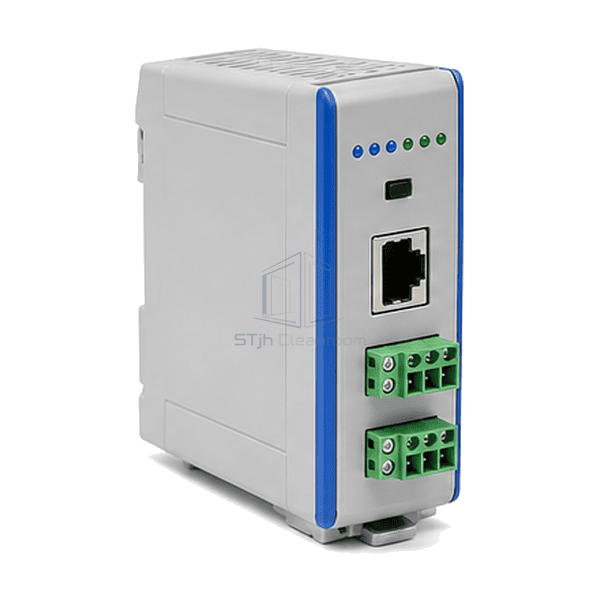
The FFU BMS communication gateway forms the data boundary between local fan filter controls and the facility automation network. Its rail-mounted housing brings the field terminals, building-side connector and status indicators into a compact control-panel module. The selected hardware and firmware determine which serial or Ethernet interfaces are fitted and how the available fan data is represented. An isolated channel or local setup connection can be included where required by the network architecture.
Expose the operating points needed by the facility system without replacing the fan's local drive electronics.
Separate operating requests, actual feedback and fault states so the building-system database has useful meanings rather than unexplained numbers.
The rail-mounted format groups network wiring at a serviceable position inside the control cabinet.
Local indications help a technician begin tracing the power and data path before opening the supervisory software.
A successful gateway purchase starts with the messages each side can actually exchange.
Common panel-gateway interfaces and configuration options for connecting compatible FFU controls to the building network.
| Integration Function | Selected FFU commands, available feedback and alarms mapped to a building-management interface |
|---|---|
| Common Control-Supply Option | 24 V DC nominal |
| Alternative Supply Option | 24 V AC, 50/60 Hz, with a compatible power-input version |
| FFU Field-Network Option | EIA-485 serial interface with Modbus RTU for compatible addressed fan controllers |
| Building-Network Choices | BACnet/IP or Modbus TCP through the selected protocol-mapping package |
| Common Ethernet Interface | RJ45 connector with 10/100 Mbps Ethernet |
| Mounting Format | 35 mm DIN rail inside a protected control enclosure |
| Field Connections | Pluggable serial terminals and an Ethernet connector on the selected hardware version |
| Wohn möglichkeiten | Engineering-plastic or metal panel-gateway enclosure |
| Local Indication | Power and communication activity indicators |
| Setup Options | PC configuration software or an embedded web interface, depending on the selected gateway |
| Interface Options | Galvanically isolated serial port, additional network channel or local configuration access |
| Customisierung | Verfügbar je nach beabsichtigter Anwendung und Betriebsumgebung. |
Choose the supported protocol variants and mapped point scope as one package. A general BACnet or Modbus label does not mean that every serial and Ethernet variant is available on the same device.
Identify the FFU control-card protocol and data map separately from the building-system protocol. RS-485 describes an electrical interface, not the meaning of the messages it carries. Select the required BACnet or Modbus variant, register or object mapping, addressing and readable or writable points together.
Use the supply voltage, polarity and current requirement of the selected gateway. Its communications terminals do not power the FFU motor, and an Ethernet connector does not imply Power over Ethernet. Check whether the power supply, network adapters and configuration tools are included in the quoted package.
Arrange the serial topology, termination, shielding and reference conductors for the selected transceivers and site wiring. State which controller owns each writable point and what the FFU should do after a stale command, network failure or restart. Electrical isolation, when selected, does not replace protective wiring or a machine safety system.
Leave room for terminal removal, cable bend radius and access to status indicators inside the control enclosure. Test scaling, alarm state and recovery with the intended fan controller and BMS together; traffic LEDs alone do not prove correct point mapping. If the project also needs room maps and local operator supervision, compare the FFU central control system.
Senden Sie uns Ihre Abmessungen, Installationsbedingungen, Leistungsziele und gewünschte Oberflächenveredelung.